Managing Data#
The TOM’s Data Models#
The TOM Toolkit includes two distinct models for data in the tom_dataproducts module:
DataProduct: Corresponds to any file containing data, from a FITS, to a PNG, to a CSV. It can optionally beassociated with a specific observation, and is required to be associated with a target. A
DataProductcan have a specified type which can be used to trigger post-save hooks to perform automated process upon ingest.
ReducedDatum: Refers to a single piece of data - e.g., a spectrum, a single measurement or a set of timeseriesphotometry measurements. It is associated with a target, and optionally with the data product it came from.
The TOM also allows a DataProductGroup to be defined. This allows TOM administrators control over which user
groups can access which data products.
Ingesting data into the TOM#
Data products for a given target can be uploaded through the Manage Data tab on the target’s detail page, or
programmatically.
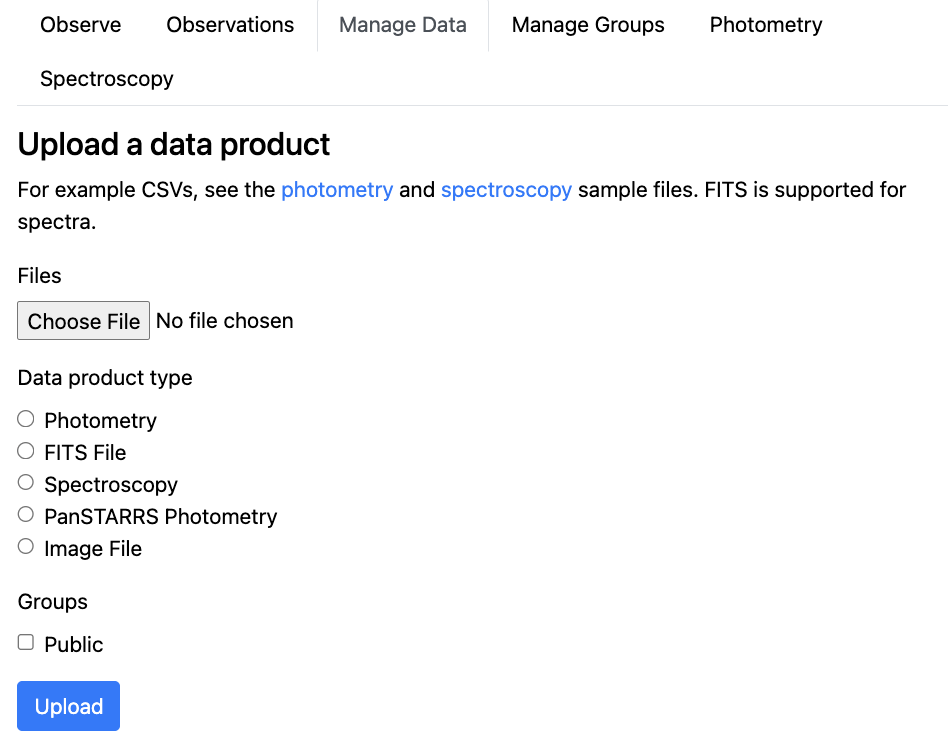
DataProduct upload form in the TOM’s target detail page#
If a data product type is specified, then the TOM calls uses post-save hooks to call the corresponding built-in
processing functions found in tom_dataproducts/processors. The TOM’s photometry_processor.py for example,
reads a photometry data file and ingests the timeseries measurements as ReducedDatum.
It’s also possible for users to add their own custom data formats and corresponding specialized processors - see Adding Custom Data Processing for more details.
Data Visualization#
The Toolkit includes built-in interactive tools for plotting data types common in astronomy, such as light curves and spectra. But it is often useful to customize these for particular science goals. Creating Plots from TOM Data describes how to create interactive plots of your data to display anywhere in your TOM.
Data Sharing#
Many users find it valuable to be able to share data from their TOM system with other people, services or directly with other TOM systems. The Toolkit includes a number of different data sharing options:
TOM-TOM Direct Sharing - Send and receive data between your TOM and another TOM-Toolkit TOM via an API.
Publish and Subscribe to a Kafka Stream - Publish and subscribe to a Kafka stream topic.
Setting up Continuous Sharing of a target’s data to a TOM or Kafka stream - Set up continuous sharing of a Target’s data products.
Survey data on a Target#
Archival data can be a valuable resource for understanding its nature and behaviour. These include data archives, which hold source catalogs, photometry, spectroscopy and imaging data in many wavelengths, as well as forced photometry services. These are offered by a number of surveys, to enable users to search for precursor observations.
The TOM include a number of built-in single-target data service query functions to allow the user to harvest data for a given object from surveys including ATLAS and Pan-STARRS.
To learn about these functions, and how to add a new service to your TOM, see Integrating Single-Target Data Service Queries.