Adding a Data Service Module for the TOM Toolkit
This guide is to walk you step by step through the process of creating a Data Service. This assumes that you want a user interface for querying your data service via a form. Many of these steps can be skipped if your service is only intended to be accessed internally.
Once fully implemented, a dataservice should automatically show up in the proper nav bar drop downs, and be able to query a service via a form, displaying results to a custom table, then finally saving desired results to a TOM’s DB.
Setting up the Basic Data Service:
First we will build the bare bones of our data service. This is the bare minimum to get the service to show up in the TOM. We’ll start with three pieces of generic code:
Our Query class (an extension of tom_dataservices.dataservice.DataService)
Our Form Class (an extension of tom_dataservices.forms.BaseQueryForm)
An integration point for our data service in Apps.py
First the actual query class:
 1from tom_dataservices.dataservices import DataService
 2from my_dataservice.forms import MyServiceForm
 3
 4class MyDataService(DataService):
 5    """
 6    This is an Example Data Service with the minimum required
 7    functionality.
 8    """
 9    name = 'MyService'
10
11    @classmethod
12    def get_form_class(cls):
13        """
14        Points to the form class discussed below.
15        """
16        return MyServiceForm
17
18    def build_query_parameters(self, parameters, **kwargs):
19        """
20        Use this function to convert the form results into the query parameters understood
21        by the Data Service.
22        """
23        return self.query_parameters
24
25    def query_service(self, data, **kwargs):
26        """
27        This is where you actually make the call to the Data Service.
28        Return the results.
29        """
30        return self.query_results
Your Data Service needs a form:
1from django import forms
2from tom_dataservices.forms import BaseQueryForm
3
4class MyServiceForm(BaseQueryForm):
5    first_field = forms.CharField(required=False,
6                                  label='An Example Field',
7                                  help_text='Put important info here.')
Adding the integration point:
 1from django.apps import AppConfig
 2
 3
 4class MyAppConfig(AppConfig):
 5default_auto_field = 'django.db.models.BigAutoField'
 6name = 'my_app'
 7
 8def data_services(self):
 9    """
10    integration point for including data services in the TOM
11    This method should return a list of dictionaries containing dot separated DataService classes
12    """
13    return [{'class': f'{self.name}.my_dataservice.MyDataService'}]
Once all of these are done, you should be able to see your basic form in a test TOM:
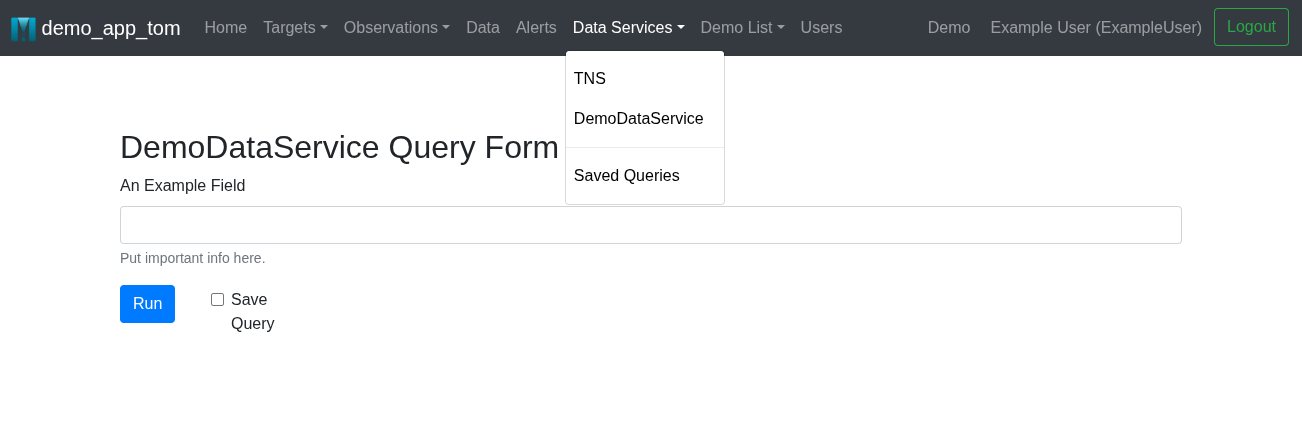
Customizing your Data Service:
The next step is to update our code to have all of the specific features relevant for our data service. Here we will focus on extending several methods of DataService to perform the specific tasks needed to interface with your data service. Ultimately there are many things that can be customized for your DataService, and many tools built into the base class to help you do this. This section will take you through the fundamentals to get you started, but you should review the full class documentation before you precede.
Filling out our MyServiceForm
First, we will need actual fields in our Form. For more on this, see the official Django docs.
DataService.build_query_parameters
Next, let’s make our build_query_parameters function inside of MyDataService actually do something. This code is to convert all of the form fields into a data dictionary or set of query parameters that is understood by the data service (or more specifically our query_service method.)
 1def build_query_parameters(self, parameters, **kwargs):
 2    """
 3    Use this function to convert the form results into the query parameters understood
 4    by the Data Service.
 5    """
 6    data = {
 7        'example_field': parameters.get('first_field')
 8    }
 9
10    self.query_parameters = data
11    return data
In some cases, this can be very straightforward, while in others this can involve complex constructions of query commands. Ultimately this is based on the API or client of your Data Service, and how you chose to name your form fields.
DataService.query_service
Next we will need to fill out our query_service module. This is the function that actually goes and calls the query service using the parameters created by build_query_parameters. This function produces query results that can then be interpreted by query_targets, query_photometry, or other functions to produce specific kinds of results that can be interpreted by your TOM.
 1def query_service(self, data, **kwargs):
 2        """
 3        This is where you actually make the call to the Data Service.
 4        Return the results.
 5        """
 6        if self.get_urls(url_type='search'):
 7            results = requests.post(self.get_urls(url_type='search'), data, headers=self.build_headers())
 8        else:
 9            results = data_service_client.search(data)
10        self.query_results = results
11        return self.query_results
Again, depending on the nature of your data service, the query_service function could take many different forms. This may also require you to create a build_headers method, or make use of the urls, get_configuration, or get_credentials`methods. Saving the results to `self.query_results could save time in other methods by not requiring you to redo the query.
DataService.query_targets
We will just use query_targets as an example. The same ideas apply to any of the individual query functions. This is the function that pulls useful data from the query results in a way that the TOM understands. In this case, we will be extracting Target data from the query results and creating a list of dictionaries containing this target data.
 1def query_targets(self, query_parameters, **kwargs):
 2        """
 3        This code calls `query_service` and returns a list of dictionaries containing target results.
 4        This call and the results should be tailored towards describing targets.
 5        """
 6        # I can update my query parameters to include target specific information here if necessary
 7        query_results = self.query_service(query_parameters)
 8        targets = []
 9        for result in query_results:
10            result['name'] = f"MyService:{result['ra']},{result['dec']}"
11            targets.append(result)
12        return targets # This should always be a list of dictionaries.
In this example, we create or modify the name of a query result so we will have something to enter into the TOM. Line 6 calls the super which will either retrieve self.query_results if it exists or run query_service. The final output should be a list of dictionaries containing target results.
At this point you should be seeing a list of Targets showing up in your TOM after you perform a query.
DataService.create_target_from_query
Continuing with our target example, we need to be able to create_target_from_query in order to actually save the target object resulting from a sucessful result for query_target above. This function expects a single instance with the same format as the list of dictionaries created by query_targets and converts that dictionary into a Target Object returning that object.
 1def create_target_from_query(self, target_result, **kwargs):
 2        """Create a new target from the query results
 3        :returns: target object
 4        :rtype: `Target`
 5        """
 6
 7        target = Target(
 8            name=target_result['name'],
 9            type='SIDEREAL',
10            ra=target_result['ra'],
11            dec=target_result['dec']
12        )
13        return target
Integrating Additional Query Types:
Above we discussed creating targets from queries, but usually the point of a query is to get data from a data service beyond the basic target information. This is where we need to build out methods like query_aliases and query_photometry.
Each of these different kinds of data will require functions in MyDataService titled query_foo() and create_foo_from_query(). These behave the same way as query_targets and create_target_from_query above, querying the data service and returning a list of dictionaries in query_foo(), and then translating an instance of that dictionary into a model object with create_foo_from_query().
Depending on the specifics of your data service, it may be reasonable to call the query_foo() methods independently, and/or part of query_targets.